Industry
Cookie consent for banking, finance and insurance
Keep marketing tags on quote forms, calculators and campaign landing pages held until a visitor says yes, with a record of every choice. Velo makes no claim to banking or payment card certification.
Examples on this page use sample data. This is not legal advice.
When compliance asks what ran and on whose consent, you should be able to show a record rather than a screenshot of the banner.
An insurance quote form, cookie by cookie
An insurer’s site has a car insurance quote form, a premium calculator and Google Ads campaigns that send visitors to both. This is the quote page for a visitor in Germany.
Illustrative example with sample data, not a customer story.
| On the quote page | What it is for | Category | Before a choice |
|---|---|---|---|
| Session cookie | Keeps the form state between steps. | Necessary | Runs |
| Fraud check | Protects the form from abuse. | Necessary | Runs |
| Google Analytics 4 | Measures how the form is used. | Analytics | Denied |
| Google Ads | Measures campaigns and builds audiences. | Ads | Denied |
The categories are an example. Which of your cookies are strictly necessary is your decision to make and defend.
Regulated firms are asked to prove it
A bank or insurer’s public website runs the same marketing tags as any other, but the questions about them come from compliance teams and auditors. They want to know what ran, on whose consent, and where the evidence is.
What goes wrong
- Advertising tags run on quote and application pages before a choice.
- Security cookies and marketing cookies are lumped into one category.
- The consent evidence is a screenshot of the banner.
What Velo does
- Keeps necessary cookies apart from analytics and advertising, with necessary always on.
- Holds scripts marked analytics or advertising until the visitor allows that category.
- Stores each decision with a receipt ID, the time, country, categories and banner version.
- Exports the latest 2,000 decisions as CSV.
What the audit trail holds
Say the visitor rejects and completes the quote anyway. This is what’s on record afterwards.
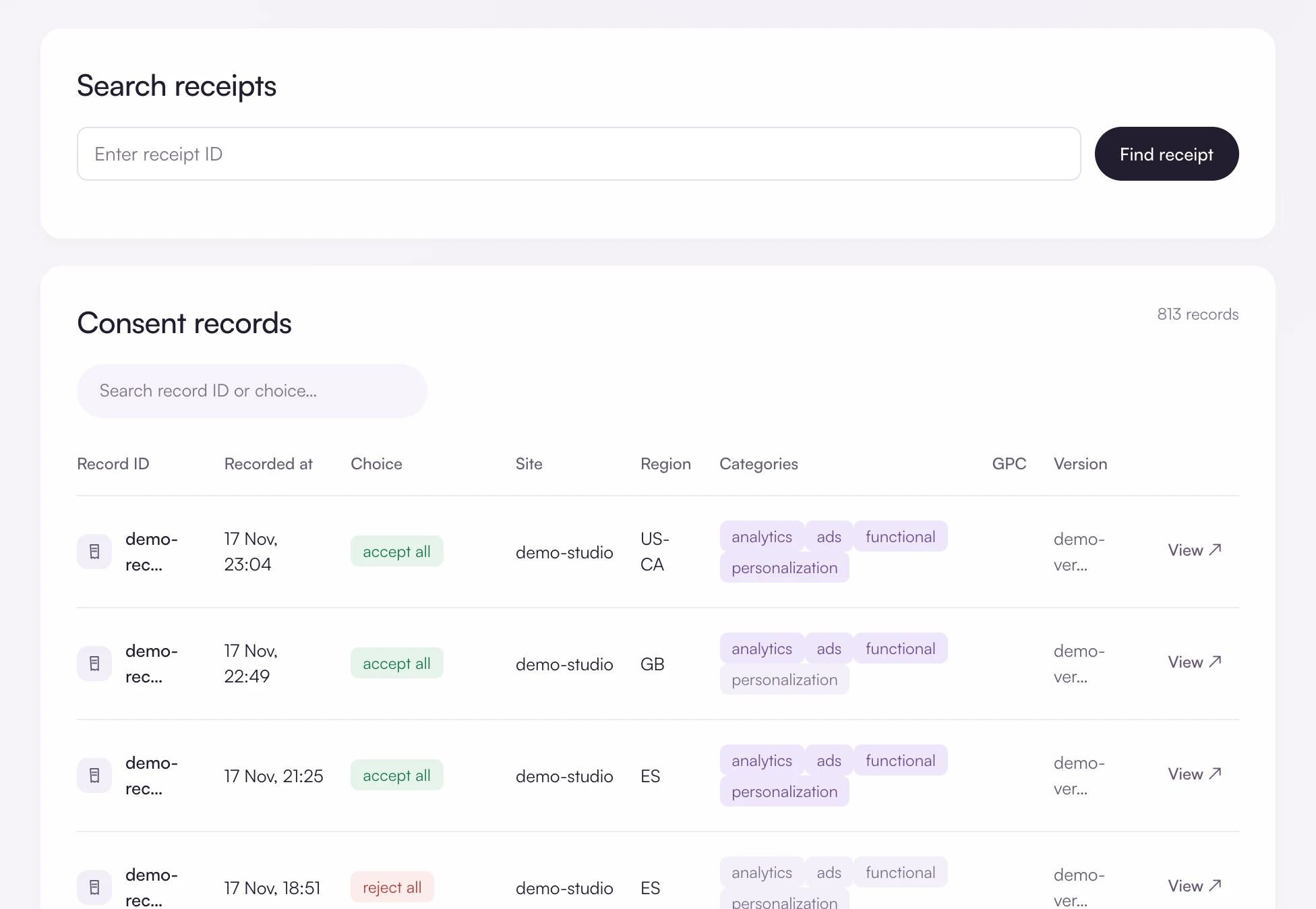
Search every decision
Consent records lists each decision with its time, choice, site, region, categories and banner version, and you can find a single receipt by its ID.
What one receipt says, and what it leaves out
The record shows the refusal, the country, the banner version shown and the time. It does not hold the visitor’s IP address, name or anything typed into the form.
Decide what is strictly necessary
In the scanner, review each cookie’s category. Only cookies your site cannot work without belong in necessary, and that decision is yours to make and defend.
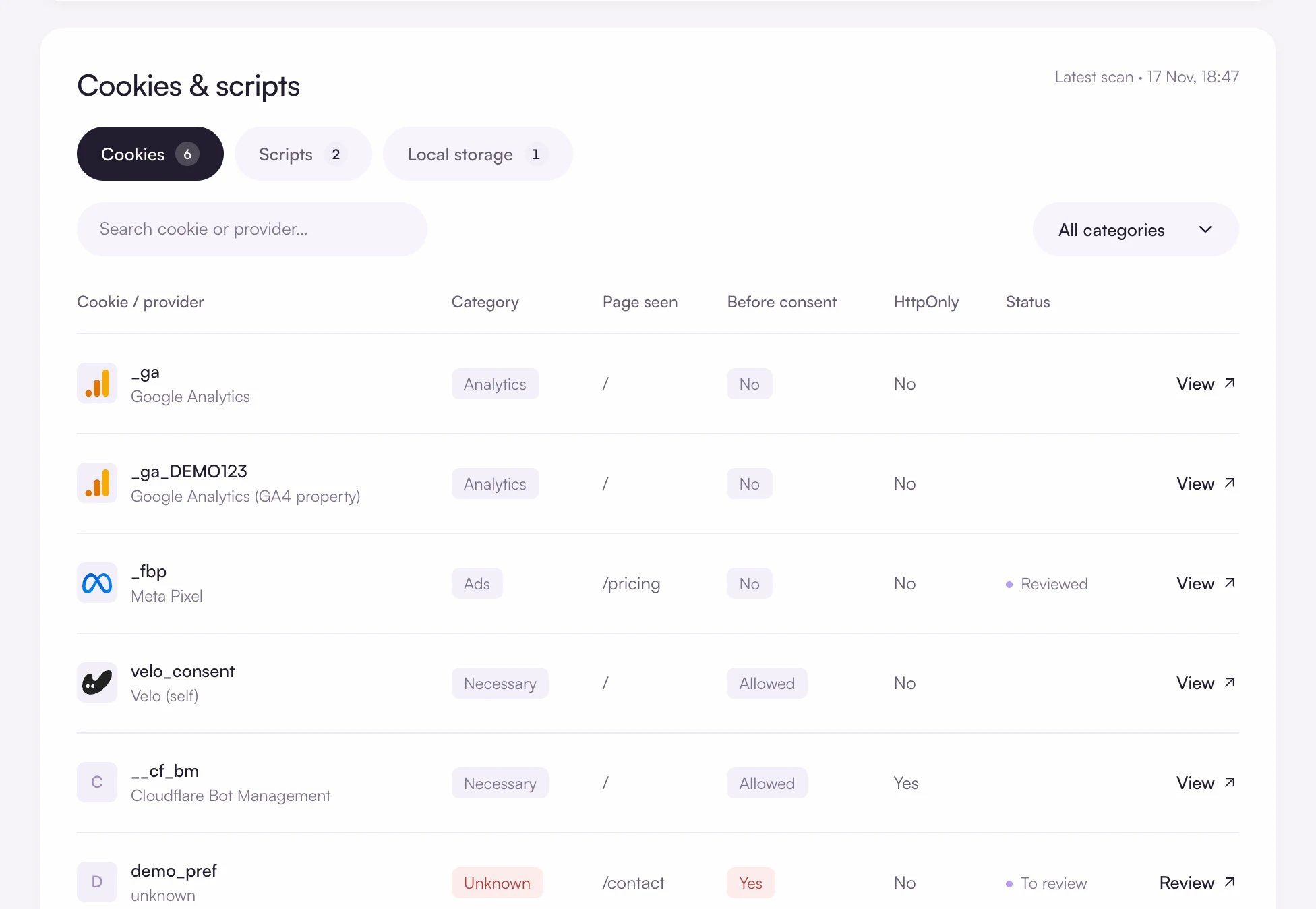
Keep marketing tags off sensitive pages
Mark scripts with a category so they wait for consent. Better still, leave advertising tags off logged in and application pages altogether. You set that in your tag manager, not in the banner.
What Velo covers, and what it does not
The limits, stated plainly, so you can decide before you install anything.
Questions and answers
Is Velo certified for financial services?
No. Velo holds no financial sector or security certification. It provides the consent banner, the signals, the regional defaults and the records. Your compliance team decides whether that meets your obligations.
Are security and fraud cookies exempt from consent?
Cookies that are strictly necessary for a service the visitor asked for are generally exempt under the ePrivacy rules. Which of your cookies qualify is a legal judgement. Velo lets you place them in the necessary category, which is always on.
Does Velo make my website compliant?
No tool can promise that. Velo gives you a banner with a real choice, regional defaults, consent signals for your tags and a record of each decision. Whether your whole setup meets the law depends on what your site does with data, which is for you and your advisers to assess.
Free for one site
Banner, scan and consent records for one site, free. Pro from €7 a month, plus VAT, for unlimited sites.